> ## Documentation Index
> Fetch the complete documentation index at: https://docs.persistence.dev/llms.txt
> Use this file to discover all available pages before exploring further.
# Billing
> Manage payment details and review workspace transactions.
Use **Billing** to manage the workspace payment method and billing address, and to review transaction history, usage, and invoices.
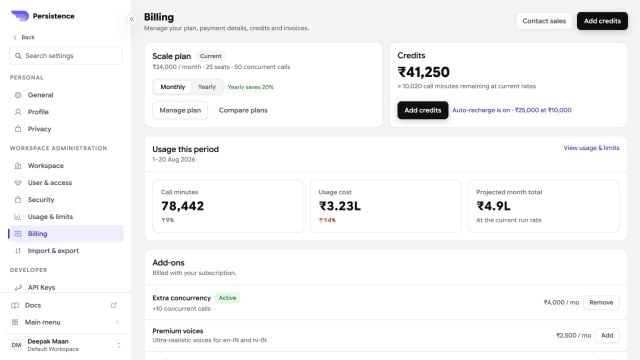
 Some paid operations require workspace credit or a valid payment method. This can include buying a phone number, running a campaign, or starting a web or telephony preview.
Keep the billing address and payment method current. Use the transaction list to investigate charges associated with workspace activity.
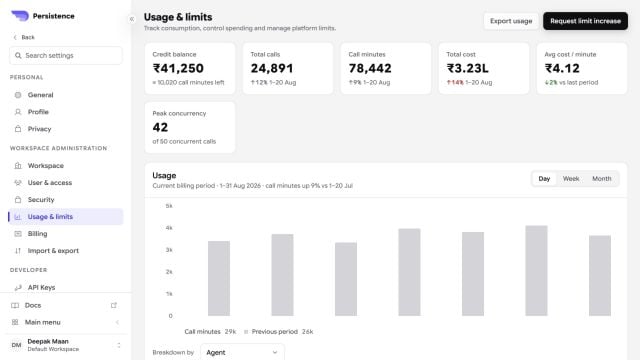
Billing analytics can summarize usage and break it down by category or agent. Download an invoice when you need an approved record for reconciliation.
Available billing controls depend on your workspace access. Ask a workspace administrator if you cannot view or update them.
Some paid operations require workspace credit or a valid payment method. This can include buying a phone number, running a campaign, or starting a web or telephony preview.
Keep the billing address and payment method current. Use the transaction list to investigate charges associated with workspace activity.
Billing analytics can summarize usage and break it down by category or agent. Download an invoice when you need an approved record for reconciliation.
Available billing controls depend on your workspace access. Ask a workspace administrator if you cannot view or update them.