> ## Documentation Index
> Fetch the complete documentation index at: https://docs.persistence.dev/llms.txt
> Use this file to discover all available pages before exploring further.
# Agents
> Create, manage, publish, import, and restore AI voice agents.
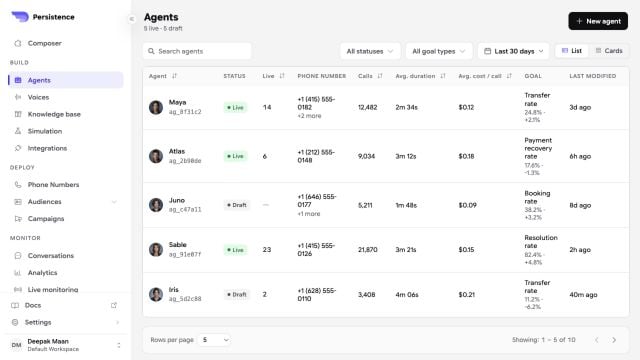
An agent defines how Persistence handles a conversation. Choose the agent structure, configure its behavior, test the draft, and publish it when it is ready for live calls.
 ## Choose an agent structure
Use one instruction set for flexible conversations that do not require a fixed sequence.
Build a visual flow with explicit conversation, condition, action, transfer, and end nodes.
## Create an agent
In the dashboard, open **Agents** and select **Create Agent**.
Select **Single Prompt** or **Conversation Flow**.
Start from a template that matches the conversation you want to automate. Review the proposed configuration before creating the agent.
Use a name that identifies the workflow, describe its main goal, and optionally provide a public website whose content can help personalize the draft. Enable **Chat only** when the workflow should use text without audio processing.
## Drafts and live versions
Changes are made to a draft. Test that draft before you publish it. Publishing promotes the current configuration for live calls while preserving earlier versions in the version timeline.
You can inspect an earlier version and restore it into a new draft when you need to roll back a change. Superseded versions are read-only.
## Import and export
The **Agents** page supports importing a `.pa` agent package up to 2 MB. An agent can also be exported from its actions menu by selecting a version. Use import and export to move a supported agent configuration without recreating it manually.
## Share an agent preview
Save an agent version, select **Share**, and choose an expiry of 1, 3, 7, or 15 days. A generated link can be opened up to 20 times and is copied to your clipboard.
The recipient can try the shared version without receiving workspace access. Treat the link as access to an agent test: do not configure the shared version to expose secrets, production customer data, or privileged actions.
## Discover reusable agents
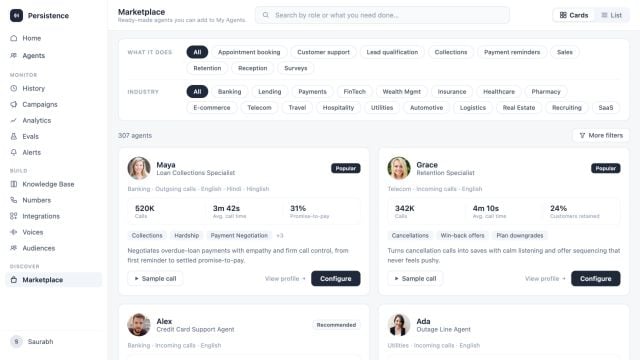
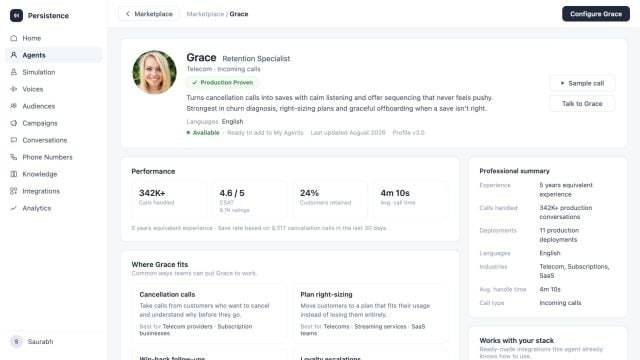
Use **Marketplace** to browse agents by job, industry, language, and outcome. Review an agent profile, listen to its sample conversation, inspect its capabilities and integrations, and configure a copy for your workspace.
## Choose an agent structure
Use one instruction set for flexible conversations that do not require a fixed sequence.
Build a visual flow with explicit conversation, condition, action, transfer, and end nodes.
## Create an agent
In the dashboard, open **Agents** and select **Create Agent**.
Select **Single Prompt** or **Conversation Flow**.
Start from a template that matches the conversation you want to automate. Review the proposed configuration before creating the agent.
Use a name that identifies the workflow, describe its main goal, and optionally provide a public website whose content can help personalize the draft. Enable **Chat only** when the workflow should use text without audio processing.
## Drafts and live versions
Changes are made to a draft. Test that draft before you publish it. Publishing promotes the current configuration for live calls while preserving earlier versions in the version timeline.
You can inspect an earlier version and restore it into a new draft when you need to roll back a change. Superseded versions are read-only.
## Import and export
The **Agents** page supports importing a `.pa` agent package up to 2 MB. An agent can also be exported from its actions menu by selecting a version. Use import and export to move a supported agent configuration without recreating it manually.
## Share an agent preview
Save an agent version, select **Share**, and choose an expiry of 1, 3, 7, or 15 days. A generated link can be opened up to 20 times and is copied to your clipboard.
The recipient can try the shared version without receiving workspace access. Treat the link as access to an agent test: do not configure the shared version to expose secrets, production customer data, or privileged actions.
## Discover reusable agents
Use **Marketplace** to browse agents by job, industry, language, and outcome. Review an agent profile, listen to its sample conversation, inspect its capabilities and integrations, and configure a copy for your workspace.
 Before deleting an agent, remove it from phone numbers and active or scheduled campaigns. Persistence blocks deletion while those assignments exist.
## Next steps
Set the voice, call behavior, transcription, data, and security controls.
Start a browser-based voice preview before publishing.
Before deleting an agent, remove it from phone numbers and active or scheduled campaigns. Persistence blocks deletion while those assignments exist.
## Next steps
Set the voice, call behavior, transcription, data, and security controls.
Start a browser-based voice preview before publishing.