> ## Documentation Index
> Fetch the complete documentation index at: https://docs.persistence.dev/llms.txt
> Use this file to discover all available pages before exploring further.
# Knowledge bases
> Create reusable knowledge collections and attach them to agents.
A knowledge base gives an agent information it can retrieve during a conversation. Use it for product information, policies, support material, or other content that should remain separate from the core prompt.
 ## Create a knowledge base
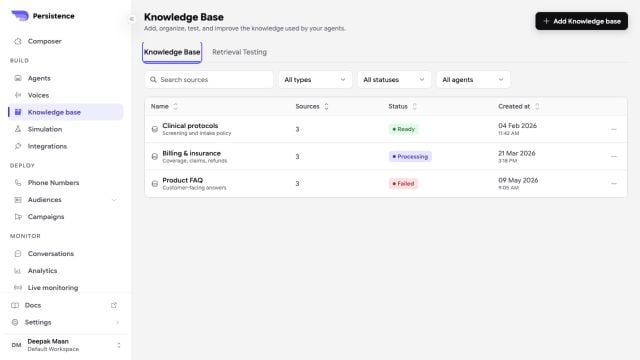
From the dashboard, open **Knowledge Base** and create a knowledge base with a clear name and description.
Upload PDF files up to 5 MB each. Wait until processing finishes before attaching the knowledge base to a production agent.
Open the agent's settings, select **Knowledge Base**, and add the ready knowledge base.
Ask questions that should be answered, should combine nearby information, and should return a fallback because the answer is absent.
## Keep retrieval reliable
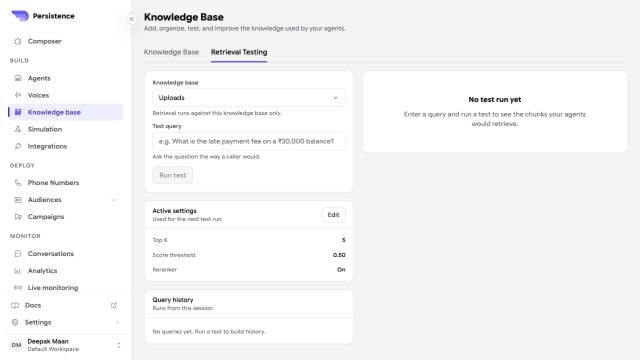
Use **Retrieval Testing** to select a knowledge base, enter a representative query, adjust supported retrieval settings, and inspect the chunks the agent would receive.
## Create a knowledge base
From the dashboard, open **Knowledge Base** and create a knowledge base with a clear name and description.
Upload PDF files up to 5 MB each. Wait until processing finishes before attaching the knowledge base to a production agent.
Open the agent's settings, select **Knowledge Base**, and add the ready knowledge base.
Ask questions that should be answered, should combine nearby information, and should return a fallback because the answer is absent.
## Keep retrieval reliable
Use **Retrieval Testing** to select a knowledge base, enter a representative query, adjust supported retrieval settings, and inspect the chunks the agent would receive.
 * Keep each knowledge base focused on one domain.
* Remove obsolete or conflicting documents.
* Use descriptive headings and plain text in source documents.
* Put behavior rules in the agent instructions, not only in the knowledge documents.
* Re-test the agent after adding or deleting a document.
An agent can only use a knowledge base that has finished processing. The agent settings identify knowledge bases that are not ready.
Document processing moves through pending, extracting, chunking, embedding, and ready states. Replace a document when it reaches failed or upload failed.
Knowledge base names can contain up to 128 characters and descriptions up to 512 characters.
Deleting a knowledge base or a source document removes it from future retrieval. Review every agent that depends on that content before deleting it.
Create, list, inspect, and delete knowledge bases through the public API.
* Keep each knowledge base focused on one domain.
* Remove obsolete or conflicting documents.
* Use descriptive headings and plain text in source documents.
* Put behavior rules in the agent instructions, not only in the knowledge documents.
* Re-test the agent after adding or deleting a document.
An agent can only use a knowledge base that has finished processing. The agent settings identify knowledge bases that are not ready.
Document processing moves through pending, extracting, chunking, embedding, and ready states. Replace a document when it reaches failed or upload failed.
Knowledge base names can contain up to 128 characters and descriptions up to 512 characters.
Deleting a knowledge base or a source document removes it from future retrieval. Review every agent that depends on that content before deleting it.
Create, list, inspect, and delete knowledge bases through the public API.