> ## Documentation Index
> Fetch the complete documentation index at: https://docs.persistence.dev/llms.txt
> Use this file to discover all available pages before exploring further.
# Audiences and contacts
> Manage campaign audiences, individual contacts, and do-not-contact suppression lists.
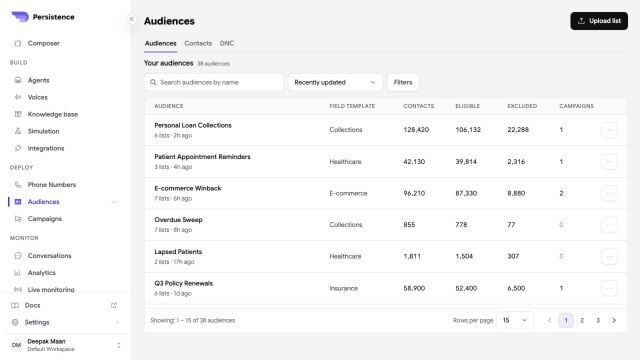
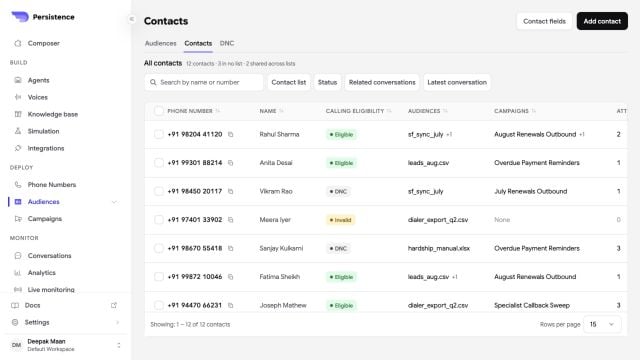
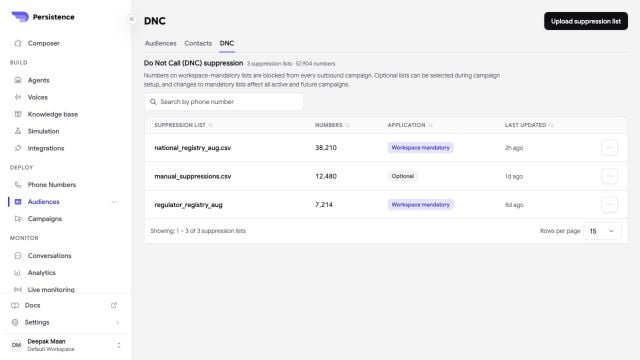
Audiences define who a campaign may call. Contacts are the individual people or phone numbers in those audiences. Do-not-contact lists, also called DNC or DND groups, define numbers that must not receive calls.
 ## Create a group
Open **Audiences** or **Contacts**, start an upload, enter a name, and choose whether the file supplies callable contacts or suppression entries.
Download the template when you need the expected file shape. Upload one `.csv`, `.xlsx`, or `.xls` file up to 21 MB, or import contacts from a connected HubSpot or Salesforce account.
Review the valid, invalid, and duplicate number counts. Persistence excludes invalid and duplicate numbers when you save the group.
Save the processed group, then select it when you configure a campaign audience.
Use a DNC or DND suppression list for numbers that must not receive campaign calls. Review suppression coverage before every launch.
You can replace the uploaded list or edit the group name and type. Check campaigns that use the group before you delete it.
Open a group to review entries and their metadata. A saved group can be ready while individual numbers remain active or blocked.
## Create a group
Open **Audiences** or **Contacts**, start an upload, enter a name, and choose whether the file supplies callable contacts or suppression entries.
Download the template when you need the expected file shape. Upload one `.csv`, `.xlsx`, or `.xls` file up to 21 MB, or import contacts from a connected HubSpot or Salesforce account.
Review the valid, invalid, and duplicate number counts. Persistence excludes invalid and duplicate numbers when you save the group.
Save the processed group, then select it when you configure a campaign audience.
Use a DNC or DND suppression list for numbers that must not receive campaign calls. Review suppression coverage before every launch.
You can replace the uploaded list or edit the group name and type. Check campaigns that use the group before you delete it.
Open a group to review entries and their metadata. A saved group can be ready while individual numbers remain active or blocked.