> ## Documentation Index
> Fetch the complete documentation index at: https://docs.persistence.dev/llms.txt
> Use this file to discover all available pages before exploring further.
# Integrations
> Connect calendar, CRM, and messaging services to Persistence.
Integrations let agents use approved external services and let workspaces import campaign contacts.
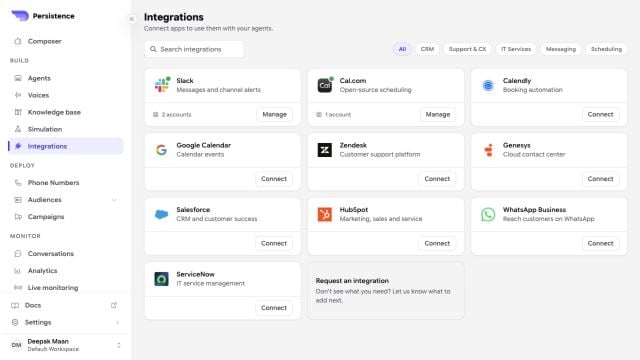 The catalog can show additional services as they become available to a workspace. Configure only integrations supported by your current workspace and release channel.
## Available integration types
| Integration | Use in Persistence |
| ----------------------------------- | -------------------------------------------- |
| [Calendly](/integrations/calendars) | Check availability and manage bookings |
| [Cal.com](/integrations/calendars) | Check availability and manage bookings |
| [HubSpot](/integrations/crm) | Use CRM tools and import contacts |
| [Salesforce](/integrations/crm) | Use CRM tools and import contacts |
| [Slack](/integrations/slack) | Send messages to selected workspace channels |
## Connect an account
Choose the service you want to connect and start its connection flow.
Complete the provider's authorization or enter the credential requested by the connection form.
Choose only the accounts, calendars, or Slack channels that the workflow needs when those controls are available.
Add the related action to an agent or select the CRM while creating a contact group.
Treat provider credentials as secrets. Store reusable values in the workspace secret controls instead of placing them in prompts or documentation.
Test the connected action in a simulated call before publishing the agent.
Disconnecting an account makes its tools unavailable to agents immediately. Review dependent agents and contact-import workflows first.
The catalog can show additional services as they become available to a workspace. Configure only integrations supported by your current workspace and release channel.
## Available integration types
| Integration | Use in Persistence |
| ----------------------------------- | -------------------------------------------- |
| [Calendly](/integrations/calendars) | Check availability and manage bookings |
| [Cal.com](/integrations/calendars) | Check availability and manage bookings |
| [HubSpot](/integrations/crm) | Use CRM tools and import contacts |
| [Salesforce](/integrations/crm) | Use CRM tools and import contacts |
| [Slack](/integrations/slack) | Send messages to selected workspace channels |
## Connect an account
Choose the service you want to connect and start its connection flow.
Complete the provider's authorization or enter the credential requested by the connection form.
Choose only the accounts, calendars, or Slack channels that the workflow needs when those controls are available.
Add the related action to an agent or select the CRM while creating a contact group.
Treat provider credentials as secrets. Store reusable values in the workspace secret controls instead of placing them in prompts or documentation.
Test the connected action in a simulated call before publishing the agent.
Disconnecting an account makes its tools unavailable to agents immediately. Review dependent agents and contact-import workflows first.