> ## Documentation Index
> Fetch the complete documentation index at: https://docs.persistence.dev/llms.txt
> Use this file to discover all available pages before exploring further.
# Simulation suites
> Run repeatable conversation suites and release gates before deployment.
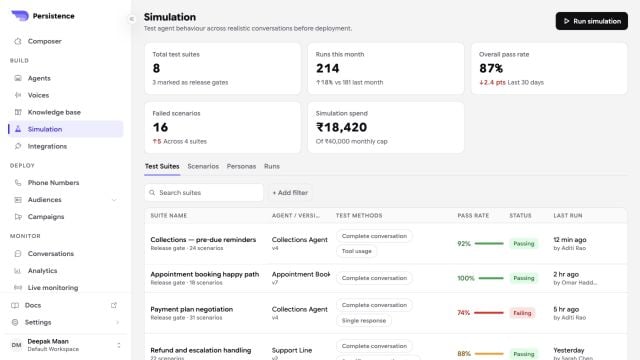
Simulation suites test agents across repeatable scenarios before deployment. Use them when a workflow needs more coverage than a single manual preview can provide.
 ## Build a useful suite
Create scenarios for the expected conversation, missing or malformed information, caller interruptions, tool failures, transfers, voicemail, silence, and policy boundaries. Select the agent version and test methods the suite should exercise.
## Review results
Use the suite pass rate and failed-scenario count to find regressions. Open a failed run, inspect the transcript and evaluation result, correct the prompt, flow, action, knowledge, or speech settings, and run the suite again.
Mark critical suites as release gates so a failing result is visible before deployment. A passing suite is evidence for the tested scenarios, not a guarantee that every production call will succeed.
Keep suites small enough to diagnose quickly, and separate critical release gates from broader exploratory coverage.
## Build a useful suite
Create scenarios for the expected conversation, missing or malformed information, caller interruptions, tool failures, transfers, voicemail, silence, and policy boundaries. Select the agent version and test methods the suite should exercise.
## Review results
Use the suite pass rate and failed-scenario count to find regressions. Open a failed run, inspect the transcript and evaluation result, correct the prompt, flow, action, knowledge, or speech settings, and run the suite again.
Mark critical suites as release gates so a failing result is visible before deployment. A passing suite is evidence for the tested scenarios, not a guarantee that every production call will succeed.
Keep suites small enough to diagnose quickly, and separate critical release gates from broader exploratory coverage.