API keys authenticate your requests to the Persistence REST API.
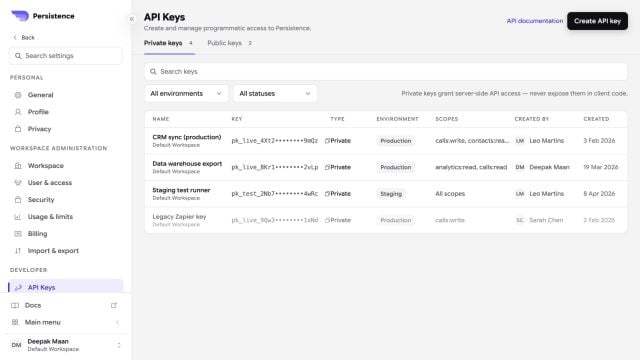
Persistence API Keys settings with masked keys, environments, scopes, and statuses

API Keys exposes environment, scope, status, creator, and creation metadata without revealing complete key values.

An API key belongs to a workspace and uses the scopes you select when you create it. A workspace can have one API key at a time.

Create a key

1

Open API Keys

In Settings, open API Keys and select Create API key.
2

Describe its use

Enter a key name and description, then select at least one scope. Grant only the scopes the integration needs.
3

Save the key

Create the key, then copy or download it immediately. Persistence shows the full key only once.

Authentication

Include your API key in the request headers:

Storing keys safely

Keep your API keys secure. Never commit them to public repositories or expose them in client-side code.
Store keys in environment variables or a secrets manager.

Replace a key

Revoke the existing key before you create a replacement. Revocation takes effect immediately, so integrations that still use the old key will fail. Plan the change, revoke the key, create and store the replacement, then update every integration that authenticates to the workspace.