

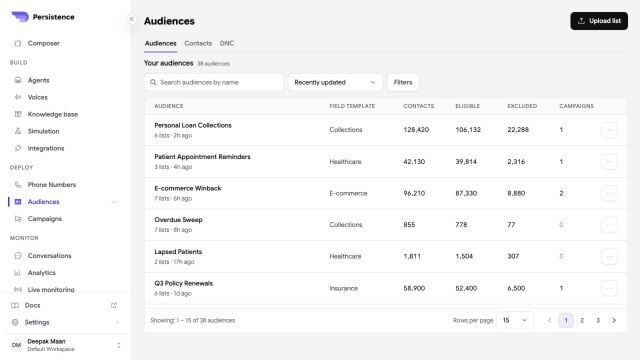
Audiences combine one or more lists and summarize eligible and excluded contacts before campaign selection.
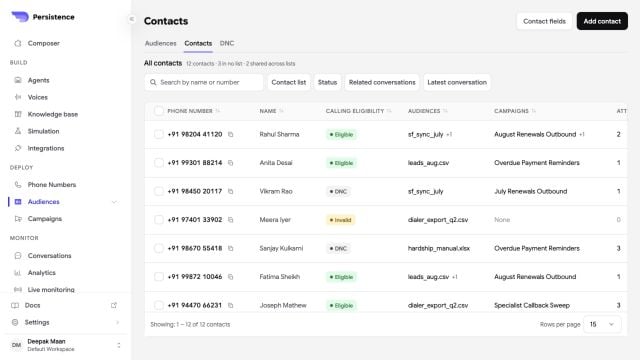
The Contacts view provides calling eligibility, audience membership, campaign use, and related-conversation filters.
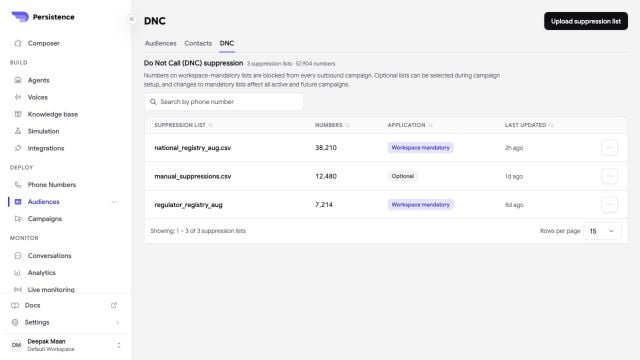
DNC suppression lists can be mandatory across the workspace or optional for selected campaigns.
Create a group
1
Start a contact group
Open Audiences or Contacts, start an upload, enter a name, and choose whether the file supplies callable contacts or suppression entries.
2
Choose a source
Download the template when you need the expected file shape. Upload one
.csv, .xlsx, or .xls file up to 21 MB, or import contacts from a connected HubSpot or Salesforce account.3
Review validation
Review the valid, invalid, and duplicate number counts. Persistence excludes invalid and duplicate numbers when you save the group.
4
Save the group
Save the processed group, then select it when you configure a campaign audience.
Use a DNC or DND suppression list for numbers that must not receive campaign calls. Review suppression coverage before every launch.