

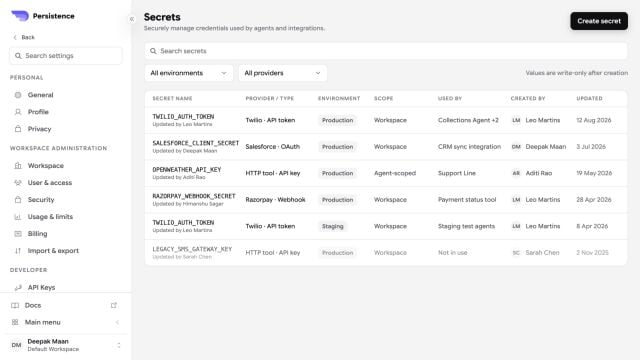
Secret Manager keeps values write-only while showing provider, environment, scope, consumers, and update history.
Create and use a secret
1
Choose a stable name
Create a name that describes the credential, such as
CRM_API_TOKEN. Avoid names that reveal the secret value.2
Store the value
Enter the credential in Secret Manager. Do not place the same value in an agent prompt, test variable, or documentation.
3
Reference the secret
In a supported credential, header, or parameter field, insert the secret using the
{{secrets.NAME}} form shown by the editor.4
Test the consumer
Run a simulated call that invokes the action or integration and confirm both success and failure behavior.