

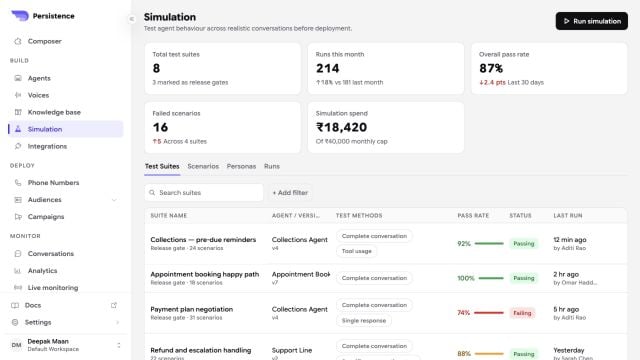
Simulation summarizes suite volume, recent runs, pass rate, failures, spend, and release-gate status.
Create a test plan
1
Create test plan
Select Create test plan. Name it, pick the agent, write a test scenario, then choose how it is checked and review.
2
Add scenarios
Cover the expected conversation, missing or malformed information, interruptions, tool failures, transfers, voicemail, silence, and policy boundaries. Add scenarios manually or with AI after the plan exists.
3
Choose a personality
Personality sets tone and style. The scenario sets the participant’s role and circumstances.
4
Start a run
Select New run. Point the run at the agent version you are about to publish. Enable Real tools only when the scenario must hit live integrations.
Review results
Use the suite pass rate and failed-scenario count to find regressions. Open a failed run, inspect the transcript and evaluation result, correct the prompt, flow, action, knowledge, or speech settings, and run the plan again. Mark critical plans as release gates so a failing result is visible before deployment. A passing plan is evidence for the tested scenarios, not a guarantee that every production call will succeed.Run report
Select View report after a run finishes. Reports are generated automatically for new runs with at least 5 distinct scenarios. The report includes:- Scenario pass rate and conversations passed
- What went wrong and What went well
- Recommended changes
- Per-scenario verdicts: Passed, Failed, Inconclusive, Execution failed, Cancelled
- Real-tool latency when Real tools was on (mocked calls do not measure tool latency)